Finance

Budgeting for Events

How to build and run a general budget sheet for your MSA: forecasting the term, tracking actual expenses, and recording a clean breakdown after each event.

Overview

Build a General Budget Sheet (like the sample above) made up of the following tabs, adding more as needed:

  1. Budgeting the Term
  2. Actual Expenses
  3. Event Breakdown
Google Sheets tab bar showing the Budgeting the Term, Actual Expenses, and Event Breakdown tabs
The three tabs of the General Budget Sheet.

1. Budgeting the Term

Setting up the sheet

  • Update the Term ## in the top-left corner.
  • Obtain the starting balance from the MSA bank account and paste it into cell H2 / I2.

Stakeholder consultation

  • At the beginning of the term, meet with the MSA President to discuss financial projects and the expenses & sources of revenue you expect to incur. Prepare a rough budget allocation across event expenses, sponsorships, donations, merchandise, etc.
  • With the allocated events budget, meet with the VP Events and VP Education to discuss how they'd like to allocate their lump-sum budget based on the expected expenses per event (e.g. a soccer competition needs more than a stargazing night). This can also be presented in the exec meeting.

Budgeting

  • Based on those conversations, update the "Budgeting the Term" tab with estimated expenses and revenues to forecast the term. You only need to fill the cells in red (expenses) and green (revenue), every other cell updates automatically via its predefined formula.

2. Actual Expenses

Setting up the sheet

  • Update the Term ## in the top-left corner.
  • Obtain the starting balance from the MSA bank account and paste it into cell H2 / I2.

Updating actual expenses

  • As the term progresses and event expenses are confirmed and settled, update this tab to reflect the actual expenses and revenue for the term.

3. Event Breakdown

Overall setup

  • Update the event names for social and educational events as they're confirmed.
  • Each event's status starts as ONGOING, then moves to Pending FINAL Confirmation and DONE as expenses/revenue are processed.
  • Total Expenses and Total Revenue sum automatically, and the Event NET is calculated automatically next to each event name via predefined formulas.

After each event

Ask the VP Events (or your delegated lead) for a breakdown of all expenses incurred so they can be recorded. The breakdown should include:
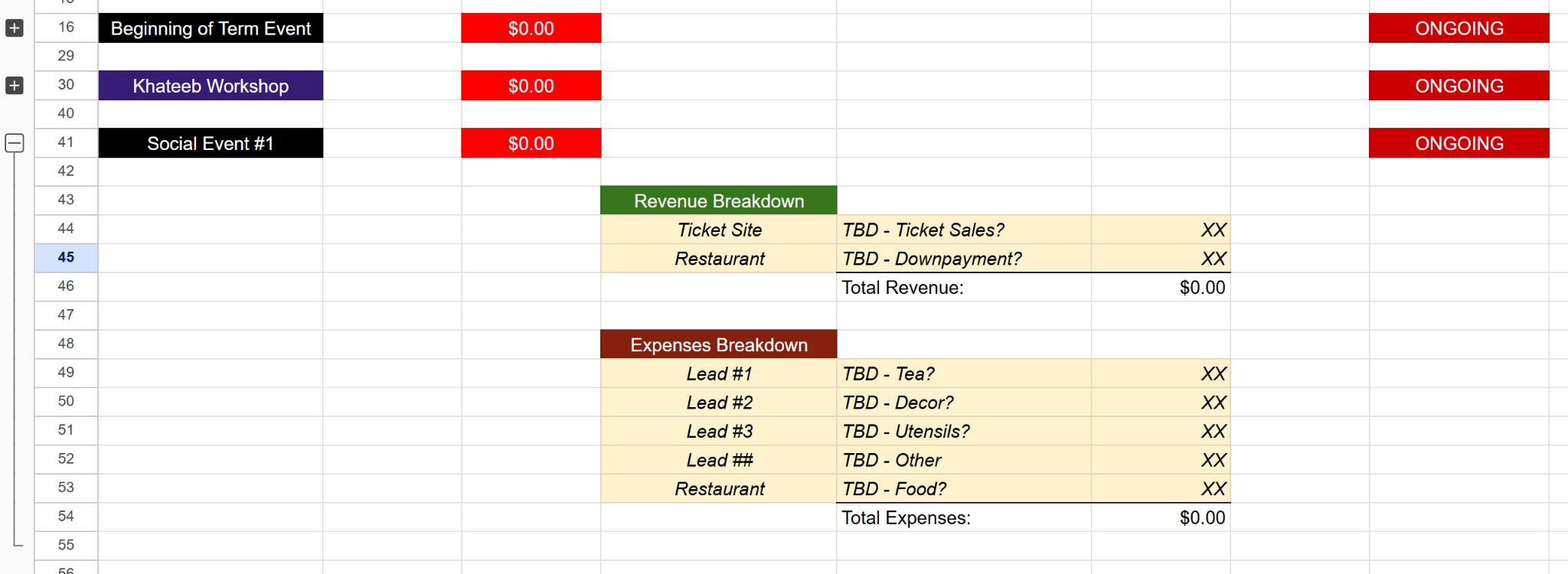
  • Item description (for both expenses & revenue).
  • The source of payment (e.g. the lead to be reimbursed, the restaurant paid, the ticketing site, etc.).
  • The expense / revenue value (use an approximation until the exact amount is available).
Event Breakdown tab with per-event rows and revenue and expenses breakdown tables
Sample Event Breakdown: each event with its revenue and expenses breakdown (placeholder values shown).