Religious

Major Lectures

As part of its duty, the MSA ordinarily hosts roughly 3-4 major educational events per term. This guide covers planning the term, reaching out to speakers, choosing topics, running the logistics, and handling the Q&A and recording.

Overview

  • The MSA hosts approximately 3-4 major educational events per term.
  • For each one, submit an event plan to the President.

When should these be hosted?

  • Space the 3-4 educational talks across the term, with at least 1-2 weeks between each.
  • The VP Education must meet with the VP Events at the start of the term to decide which dates each is taking (Events also hosts ~4 social events per term).
  • Ensure events don't clash with other events either, Jumu'ah, tajweed classes, IIC/OSP events, or any other ongoing initiatives.

Speaker Outreach

  • Ensure the speaker is eloquent and engages the audience in a captivating manner.
  • For how to reach out, see the SOP: Speaker Contact (etiquette summarized below).
  • For past speakers we've hosted, see the MSLA Speakers List.

Etiquette of reaching out to speakers

  1. Start any message in the name of Allah (bismillah), this is from the Sunnah.
  2. Use the appropriate greetings and start with salaam.
  3. Introduce yourself briefly, mentioning your association with the University MSA.
  4. In the interest of brevity, get to the point quickly and state the purpose early and clearly. If the speaker was referred or spoke at MSA events before, you can mention how well-received it was.
  5. Emphasize the interest and importance of the lecture, and give the prospective individual appropriate respect.
  6. Suggest topics and dates, offer a few suitable dates (per the events calendar) to avoid time-consuming back-and-forths. Give multiple options, but not too many.
  7. Offer relevant accommodations (e.g. transportation costs such as gas/bus fees), validate this before making the offer.
  8. Mention any relevant context (e.g. transfers in roles/responsibilities where relevant).
  9. Thank them in the Sunnah manner and leave final regards.

Topic / Theme Selection

  • Choose topics wisely, not too generic, and applicable to a young Muslim university-age group.
  • Once details are confirmed, let the marketing team know so they can publish an event poster (think of an exciting event title).
  • For inspiration, past events have included: Intro to Hadith Sciences (Sh. Omar Subedar); Intro to Sciences of the Qur'an (Ustadh Hassan); History of Islamic Spain (Br. Hassan Munir); Islamic Finance (Sh. Kamil Ahmad); and many more.

Logistics & Execution

  • Welcome: receive the speaker warmly (at the parking lot if they're driving into town) and direct them to the lecture hall.
  • Prayer: account for prayer times when choosing the time of the talk.
  • Refreshments: ensure snacks are served, even if as simple as pizza.
  • Lanyards: found in the locker; ensure all execs and education leads wear them.
  • Greeters: station a brother to greet brothers and a sister to greet sisters as people enter.
  • Agenda: have an itinerary/rundown for the event (sample below).
  • Segregation: have separate brothers' and sisters' entrances.
Time Agenda Item Leading
6:00pmSnacks are distributed[lead name]
6:15pmOpening Du'a[lead name]
6:17pmSpeaker Introduction[emcee name]
6:20pmTalk Begins[speaker name]
8:00pmTalk Ends, closing remarks[emcee name]
8:10pmPrayer is conducted[imam]

Conducting the Q&A

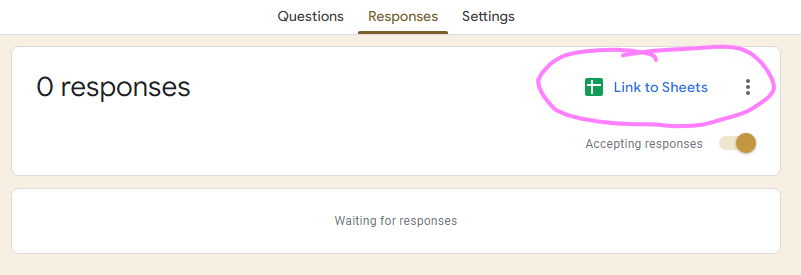
  • At the end of each lecture, it's standard practice to allow a Q&A with the speaker. Set up a Google Form (see the sample form) and link the responses to a new sheet.
Link to Sheets button on the Google Forms Responses tab
On the form's Responses tab, use "Link to Sheets" to send responses to a new spreadsheet.
  • Make the form available to the audience via a QR code and a tinyurl displayed on a slideshow such as the sample Lecture Slideshow.
  • While the emcee asks the questions, someone with a laptop and access to the sheet should filter them so only relevant questions are asked:
    • Highlight green, questions to ask (priority).
    • Highlight yellow, ask only if all green questions have been asked (not priority).
    • Highlight red, questions not to ask.

Recording / Photography

  • Reach out to the marketing team and ensure a member comes with filming equipment (camera, mic, camera stand) to record the talk, which will then be posted on YouTube.
  • Remember to ask the speaker for permission to record and post online.
  • For the recording workflow, see the Lecture Recording & Livestreaming how-to.